
Issue your electronic invoices on SIFEN. The month’s VAT follows.
Invoices, credit and debit notes, remission notes and self-invoices, from the panel or by API. Timbrale signs, transmits and emails the KuDE to your customer; from what gets approved it builds Form 120 so you or your accountant can close the month.
When you sign up we unlock the Completo plan: 14 days counted from your first approved invoice; after that you stay free with 5 documents a month. No card.
- Automatic retry if SIFEN does not answer
- Rejections explained in Spanish
- PYG, USD, BRL, ARS and EUR
- Your accountant gets in for free
| Description | Qty | Gs. |
|---|---|---|
| Monthly service | 1 | 450.000 |
| Installation | 1 | 150.000 |
| VAT included 10% | 54.545 | |
| Total | 600.000 | |
CDC 0180012345000100100001232026092910000012345…
From certificate to first invoice
You upload the certificate
Load the company's digital certificate and timbrado. We validate the expiry dates and warn you before they lapse.
Integrate the API or open the panel
One key per environment and a POST with an Idempotency-Key: retrying the same key returns the same document. With no developer, the Issue screen does the same job.
You issue
We sign, transmit to SIFEN and retry from a queue if the agency does not answer. Status arrives by webhook and in the panel.
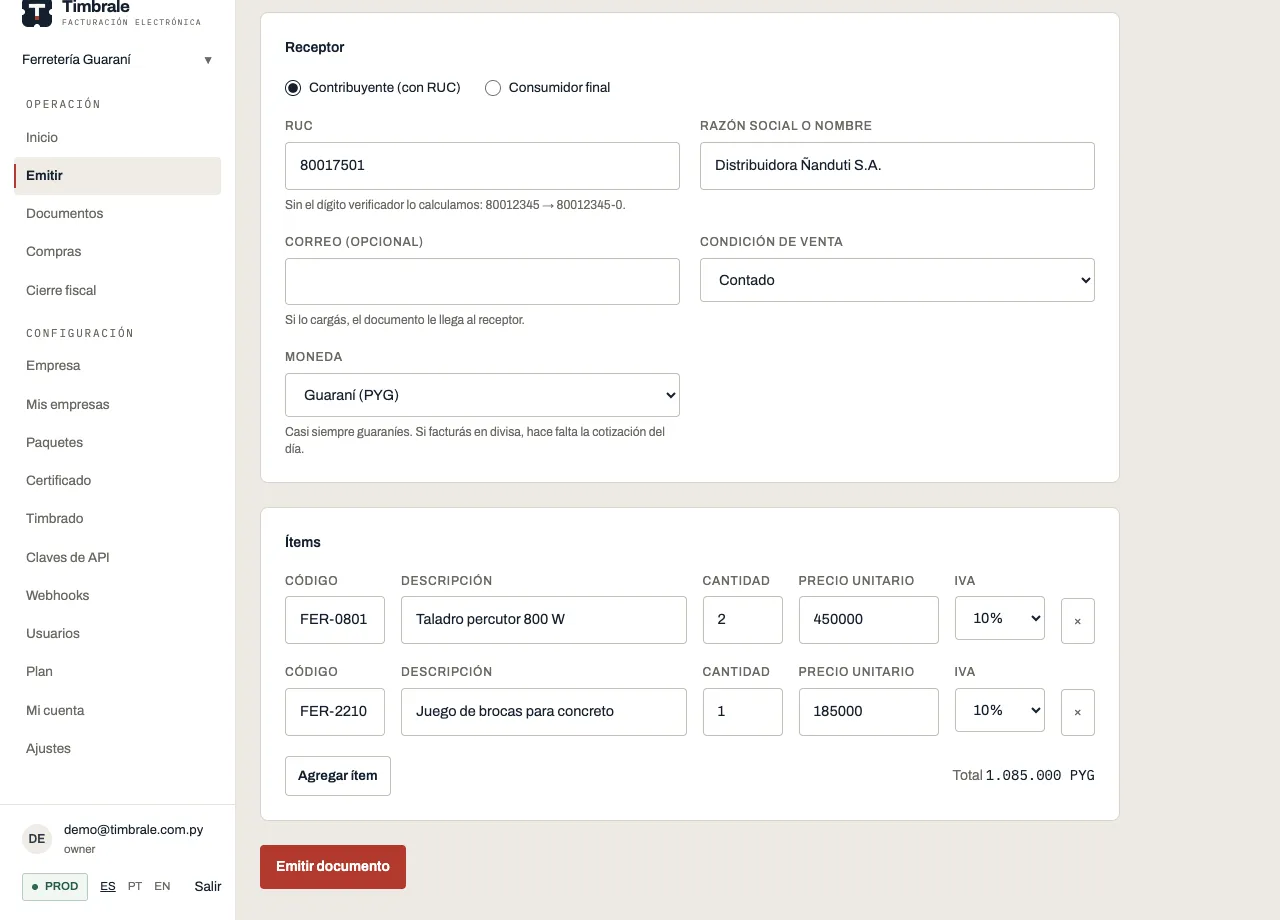
What you can issue today
Taxpayer recipients with RUC, final consumers with CI and foreign customers. Operations in PYG, USD, BRL, ARS or EUR, with the exchange rate recorded. One at a time or in batches.
From invoice to tax return
Issuing is the first step. The hours go into what comes after, up to the tax return.
During the month
You issue
- Factura, Autofactura, Nota de Crédito, Nota de Débito and Nota de Remisión, from the panel or by API.
- The KuDE PDF is e-mailed to the recipient as soon as SIFEN approves.
- If SIFEN does not answer, the document waits in a queue and retries on its own.
- Every SIFEN rejection tells you which field to fix.
Every night
We reconcile with SIFEN
- We compare your documents with what SIFEN has on record.
- We flag untreated rejections and gaps in the numbering.
- We catch cancellations made on SIFEN that never showed up here.
- We warn you before the timbrado expires and blocks issuing.
At month end
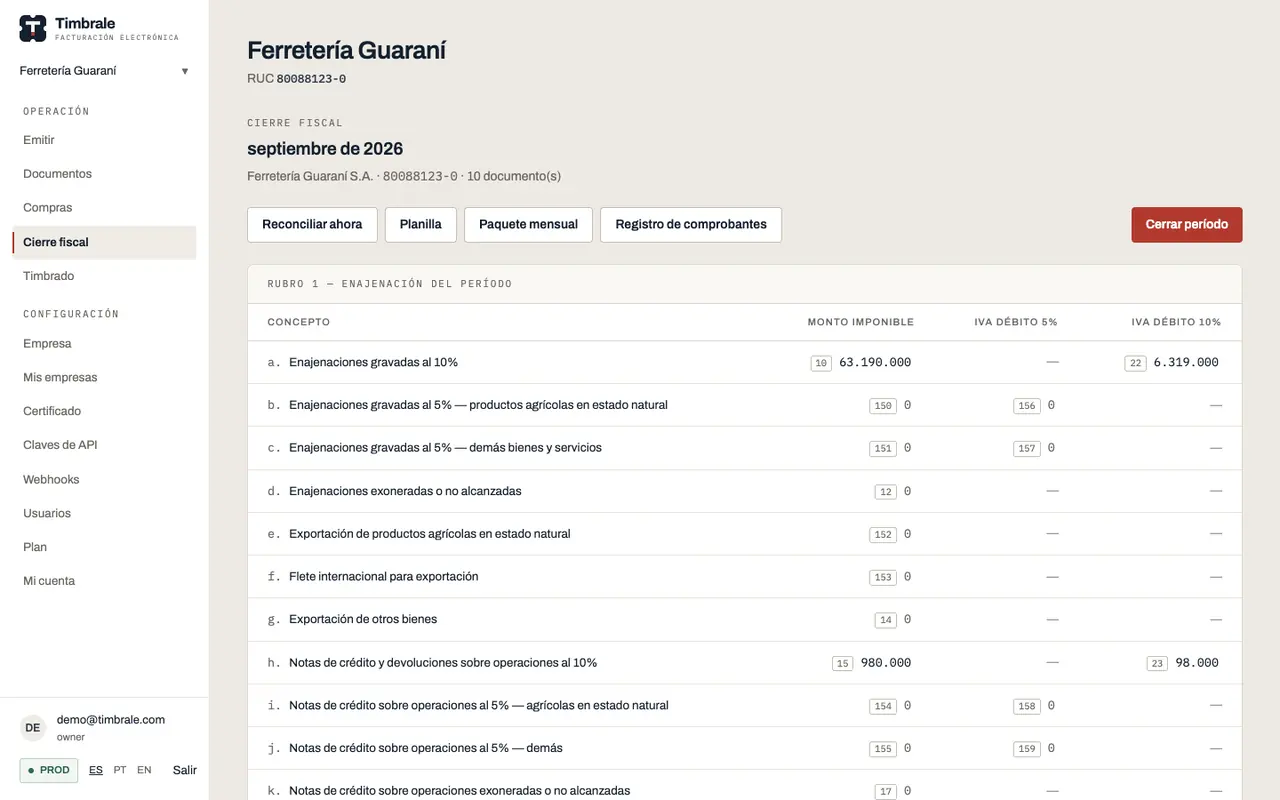
Form 120 ready for Marangatú
In every plan, the free one included
- Sections 1 and 2 calculated box by box, with the documents behind every amount.
- VAT return deadline based on your RUC, with an e-mail reminder five days before.
- XLSX sheet, monthly ZIP package and receipt register for the accountant.
- A closed period stays frozen: a back-dated document shows up as a discrepancy.
If the DNIT asks
Audits and amended returns
On Completo, Comercial and Enterprise
- Audit dossier with the signed XML for a date range and an integrity check for each one.
- Amended return assistant: which box changed since the close and which documents explain it.
Purchases · Rubro 3
Input VAT starts at the phone camera
Half of Form 120 is purchases. Scan the KuDE QR code the moment the invoice reaches you: Timbrale looks it up in SIFEN, fills it in and adds it to Rubro 3.
Scan the QR code
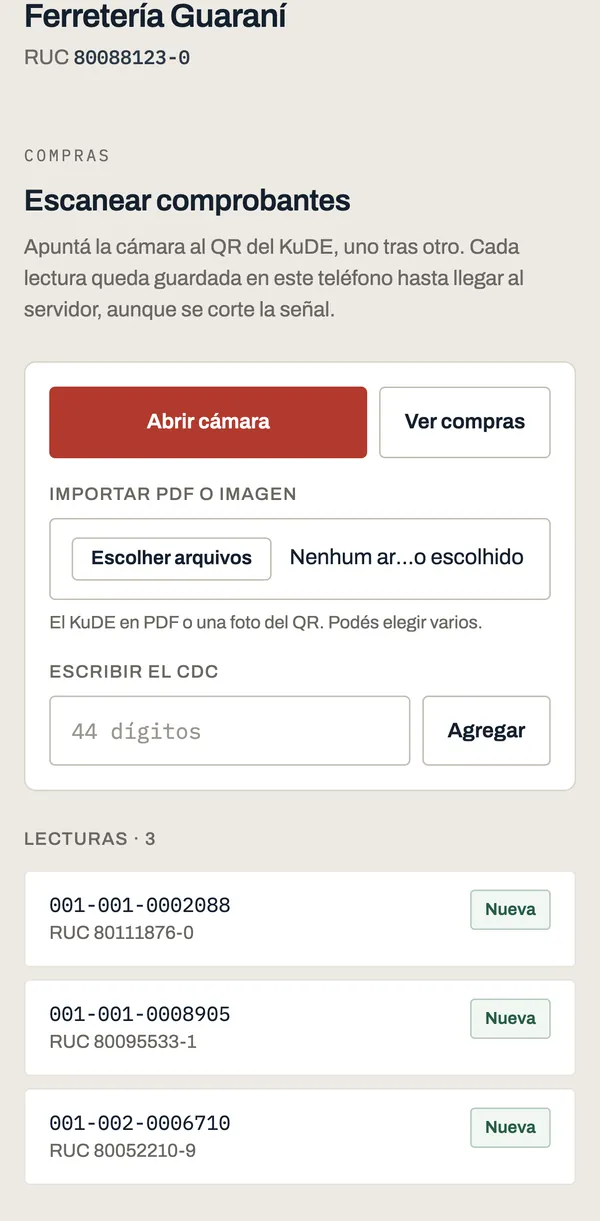
One after another, standing at the counter. Every read stays on the phone until it reaches the server, even if the signal drops.
Confirm what came in
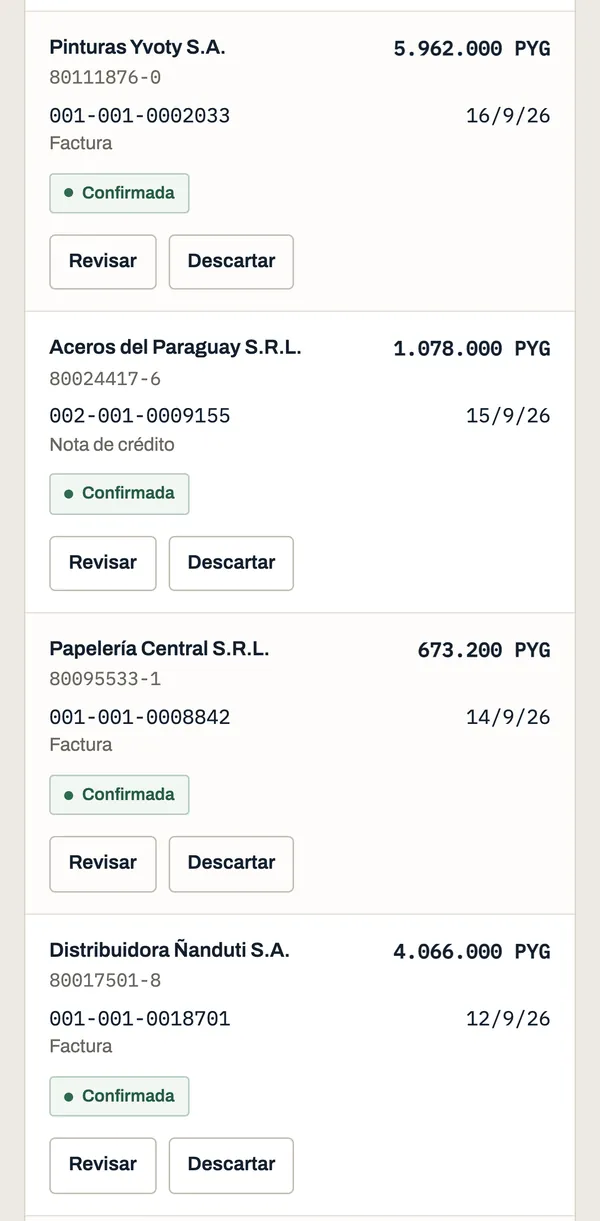
Timbrale queries the CDC in SIFEN and fills in supplier, timbrado, amounts and VAT. You confirm; if a purchase is missing a field, it names the field.
Rubro 3 comes out calculated
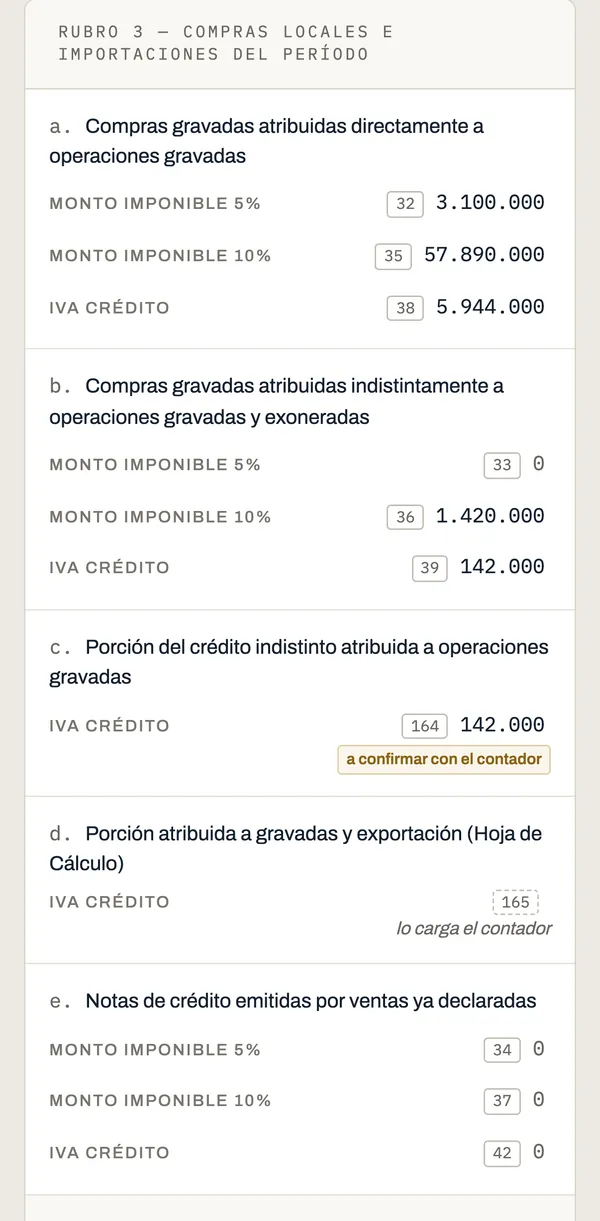
Box by box, with the direct share, the mixed share and the box 164 pro-rata. Whatever is left for the accountant is flagged.
You can also import the KuDE PDF, a photo of the QR code, or type the CDC by hand. Screenshots come from a demo company.
An accountant? Your client scans, you close the month.
One price per point of sale
Start free. When you sign up we unlock Completo, no card, and the 14 days count from your first approved invoice. After that you move up or down from the panel — no call, no contract.
Unlimited documents from Gs. 200.000 a month, and a permanent free plan to start.
Gratis
To try it out or issue very little
Gs. 0/month
- 1 point of sale
- 5 tax documents per month
- Up to 20 purchases per month
- 2 users
- Permanent, not a trial
Esencial
Small shops, IRE SIMPLE, busy professionals
Gs. 75.000/month
- Up to 2 points: + Gs. 35.000 for the second
- 100 documents per month, shared across points
- Up to 100 purchases per month
- 2 users
- Issue from the panel
Completo
14 days freeAny company
Gs. 200.000/month
- 1 point included; each extra point + Gs. 70.000, no cap
- Unlimited documents, up to 5 GB of storage per point (~250k invoices)
- Unlimited purchases
- Multiple users and branches
- Issuing API in production
- Amended return assistant
- Tax audit dossier with an integrity check on every XML
Comercial
Shops with stock and suppliers
Gs. 300.000/month
- 1 point included; each extra point + Gs. 70.000, no cap
- Unlimited documents, up to 5 GB of storage per point (~250k invoices)
- Unlimited purchases
- Everything in Completo
- Point of sale with barcode scanner and 80 mm receipts
- Payables with due dates and partial payments
- Products with final price and VAT
- Stock by movements, with restock alerts
- Free F1 digital certificate when paying yearly
Accountant? You pay per company, with a client-book discount and one monthly invoice for the firm.
Included in every plan, the free one too
- Form 120 VAT close, with the detail behind each box (casilla)
- Reconciliation of your documents against SIFEN
- Exports: XLSX spreadsheet, monthly ZIP package and comprobantes register
- Record of the filed return (DJ): number and receipt
- Access for your accountant to the company
- VAT due-date calendar from your RUC
- Scan purchase receipts by QR from your phone, with the input VAT in Section 3
Paying yearly saves you 10%. The test environment is unlimited on every plan, the free one included.
Custom integration or unusual volume? Message us on WhatsApp
Questions before you start
Do I need a developer to issue documents?
No. You can fill in the invoice or note by hand in the panel and we sign and transmit it exactly as we do over the API. The API in production comes with Completo, Comercial and Enterprise; in test you can use it on any plan, the free one included.
Does Timbrale file the VAT return?
No. We calculate Sections 1 and 2 of Form 120 from your approved documents and hand you every box ready to enter in Marangatú. Purchases (Sections 3 to 6) are completed by your accountant, and afterwards you record the filed return number in the panel.
Are you a PSC? Do you register my company with the DNIT?
We are not a PSC and we do not act on your behalf. You obtain the electronic invoicing authorisation from the DNIT yourself — it is Form 364, which arrives in your Marandu inbox — and every company issues with its own digital certificate.
Where do I get the digital certificate and the CSC?
You buy the certificate from a certification service provider authorised in Paraguay. The exception is the Comercial plan paid yearly: the company F1 digital certificate is on us. The DNIT gives you the CSC along with the authorisation, one per environment. Both are uploaded from the panel, with no support ticket.
I already issue with another system. Do I lose my numbering?
No. When you register the timbrado you set the next number to issue and we carry on from there, per timbrado and per point of issue. It is a field in the panel, not a migration.
How do I downgrade or stop paying?
From the panel, by picking Gratis or a smaller plan. No call, no contract, no minimum term. The documents you already issued stay where they are.
What happens to my certificate and my card?
The certificate and the CSC are uploaded encrypted and never come back down: of the certificate we keep only its validity dates. Card details are held by the payment provider and never pass through Timbrale.
New · Comercial plan
For retailers: sell, track stock and close the month in one system
The counter sale leaves the till already approved by the SIFEN, moves the stock and lands in the month's VAT. No POS on one side and an invoicing tool on the other.
Pay yearly and the F1 digital certificate is on us.

For developers
One JSON POST, one tax document
If your system already invoices, connect it to the same platform. XMLDSig, CDC, QR and SIFEN’s mTLS SOAP stay on our side; when DNIT changes the XML, we update.
- Idempotency-Key: retrying with the same key returns the same document, no numbers burned.
- Webhooks with the SIFEN status, no polling loop.
- KuDE PDF by API, with each environment’s key.
- Test API on every plan; production with Completo.
POST /v1/documentos
Authorization: Bearer sk_prod_...
Idempotency-Key: 9f2c-4a11

{
  "tipoDocumento": "factura",
  "establecimiento": "001",
  "puntoExpedicion": "001",
  "moneda": "PYG",
  "condicion": { "tipo": 1 },
  "cliente": {
    "contribuyente": true,
    "ruc": "80012345-0",
    "razonSocial": "Demo SIFEN S.A.",
    "tipoOperacion": 1
  },
  "items": [
    {
      "codigo": "SRV-01",
      "descripcion": "Servicio mensual",
      "cantidad": 1,
      "precioUnitario": "450000",
      "iva": 10
    }
  ],
  "factura": { "presencia": 2 }
}202 Accepted
{
"id": "0f3a...",
"cdc": "01800123450001001000000112025...",
"tipoDocumento": "factura",
"numeroCompleto": "001-001-0000001",
"status": "queued",
"moneda": "PYG",
"total": "450000",
"ambiente": "test"
}For accountants
Every client under one account
One account with your e-mail and, inside it, every company you serve. Each with its own certificate, timbrado, monthly close and plan: no shared numbering, no shared quota.
You
Your client
You
Open My companies and see “Today”: which return is due, which is overdue and which client still cannot issue.
Your client
Gets an e-mail when their VAT return is coming due, even if they never open the panel.
You
Register the client’s company with RUC and legal name, without waiting for the owner to sign up.
Your client
Gets access when you invite them from Users, and stays the owner of their company.
You
Rubro 3 arrives calculated: direct base, mixed base and the box 164 pro-rata, with the purchase behind every box. Whatever is left for you is flagged.
Your client
Scans the KuDE QR code with the phone as soon as the invoice arrives, instead of saving it all up for the 5th.
You
See each client’s last six months —open, with discrepancies, closed, filed— and export several at once.
Your client
Their certificate, timbrado and numbering stay isolated from your other clients.
You
Switch clients from the selector, without signing out or remembering another password.
Your client
Your accountant access takes no seat in their plan, not even the free one.
You
Open as many accounts as you need: we do not charge per client.
Your client
Pays for their own plan: you do not resell the service or front the money.
Opening the account is free, no card. Each company starts with 5 documents per month and the test environment is unlimited.
The small client who issues little goes on Esencial: Gs. 75.000 a month with 100 documents. The one who barely issues stays on the free plan, at no cost.
Start in test today, no card
Create the account, issue your first document against the SIFEN test environment and see how the month’s close looks. Once you load the certificate, you move to production.
Migrating numbering or have tax questions? Message us on WhatsApp or email contacto@timbrale.com.py.